 LLM Mask
For small companies that use ChatGPT, Copilot and other AI chats
Use AI at work without leaking customer data
LLM Mask checks what your team pastes or types into AI chats, on their own computer, and swaps names, IBANs, citizen numbers and passwords for placeholders. When they copy the answer, the real details come back.
No account. No server. Nothing is sent to us.
What you paste
Mail Pieter Hendriks, IBAN NL91 ABNA 0417 1643 00
What the AI receives
Mail [NAME_1], IBAN [IBAN_1]
Works on
ChatGPT · Claude · Gemini · Copilot · Perplexity · Mistral · Grok · DeepSeek · Meta AI
In Chrome and Edge. On phones: a free web page that does the same check.
Your team already uses AI. The risk is one paste away.
A customer email, a spreadsheet row, a patient note: pasted into a chat to save time. Once it is sent, it sits on someone else's servers. Most companies have no rule for this, and the ones that do can't check it.
- Customer names, email addresses and phone numbers
- Citizen numbers (BSN), IBANs and card numbers
- Health information and medical codes
- Passwords, API keys and access tokens
- Your own client names, project names and internal terms
How it works
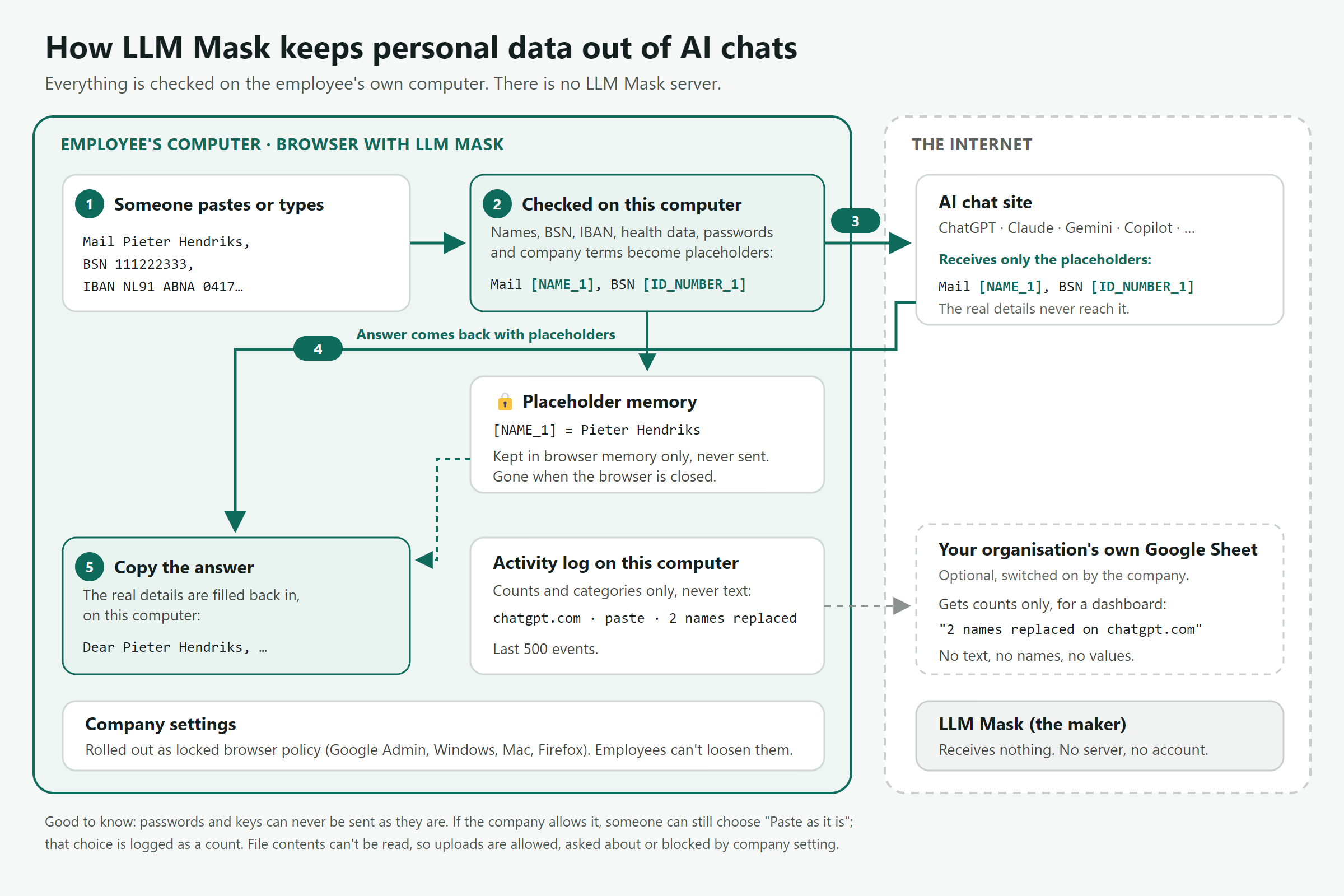
Everything happens in the browser on the employee's computer.
- 1
Someone pastes or types
Into ChatGPT, Claude, Gemini, Copilot or another supported AI chat.
- 2
Checked on their computer
Names, citizen numbers, IBANs, health data, passwords and your company terms are found and replaced with placeholders such as [NAME_1].
- 3
The AI only gets placeholders
It can still follow the text and write a useful answer. The real details never reach it.
- 4
The answer comes back
With the same placeholders: "Dear [NAME_1], …".
- 5
Copy the answer
LLM Mask fills the real details back in, on the same computer: "Dear Pieter Hendriks, …".
Built for the way people actually work
Ask first, or replace automatically
Show what was found and let the person choose, or swap details straight away. The dialog coaches people at the moment it matters. Passwords and keys can never be sent as they are.
Checks typed messages too
Not just pastes: a message is checked again when someone presses Enter or the send button.
Real details back on copy
Copy an answer and the placeholders become the real names and numbers again, only on your computer.
Spreadsheets: column names only
Paste a table and LLM Mask offers to send just the headings, or the table without its personal columns. Enough for a formula or an analysis plan; the personal data stays with you.
Your own company terms
Add client names, project names or internal domains, and they are replaced like any other detail.
Files and downloads
Text, Word, Excel and PowerPoint files are checked inside and can go as a cleaned copy; with LLM Mask Plus also PDFs, scans and photos. Other files are allowed, asked about or blocked by your setting. Downloads from AI chats can be recorded or blocked.
Warns about suspicious answers
If a copied answer contains hidden characters or instructions aimed at another program, LLM Mask points it out.
Eleven languages
English, Dutch, German, French, Spanish, Arabic, Italian, Portuguese, Turkish, Hindi and Japanese, following the browser's language.
What it recognises
- Names
- Email addresses and phone numbers
- Home and business addresses
- Citizen and ID numbers: Dutch BSN, Belgian, German, ID numbers from 20+ European countries and from Turkey, Latin America, the Middle East, India, Pakistan and China, passports
- IBANs and card numbers
- Dates of birth
- Customer and reference numbers
- Energy meter and EAN codes
- Health data and medical codes
- Passwords, keys and tokens
- Your own company terms
On our test set of 924 realistic texts, LLM Mask caught 99.8% of the sensitive details, with false alarms on 0.7% of clean texts.
Private by design, not by promise
LLM Mask has no server. There is nothing to hack, subpoena or sell.
Checked on the computer itself
The text you paste is checked in your browser and never sent to us.
Placeholder memory stays in the browser
The link between [NAME_1] and the real name is kept in browser memory and is gone when the browser closes.
No account, no tracking
We don't know who uses LLM Mask or what they paste. The extension only runs on the AI chat sites and asks for just two other permissions: storage and downloads.
Optional reports go to you, not us
Companies can send counts, such as "2 names replaced on chatgpt.com", to their own Google Sheet. Never text, names or values.
What LLM Mask doesn't do
- It reads inside text, Word, Excel and PowerPoint files and offers a cleaned copy; PDFs, scans and photos only with LLM Mask Plus. Other files it asks about or blocks, depending on your setting.
- It can't check the ChatGPT or Copilot phone apps; no extension can. Use the free web page on phones.
- If your company allows it, someone can still choose to paste the original. That choice is counted in the activity log.
Enterprise AI security, or LLM Mask?
Large security platforms now offer AI data protection too. They work differently, and they are built for a different size of company.
| Enterprise AI security platforms | LLM Mask | |
|---|---|---|
| Where your text is checked | Typically in the vendor's cloud: your internet traffic is routed through it and inspected there | In the employee's own browser. Nothing is routed anywhere |
| Who can read the prompts | The platform can extract and classify prompts and answers, for the employer to review | Nobody. Counts and categories only, never the text |
| When sensitive details are found | The prompt is blocked, or the employee gets a warning | Details are replaced with placeholders, the AI still gives a useful answer, and the real details return when it is copied |
| What is covered | All apps and devices behind the platform, including desktop apps and developer tools | The listed AI chat sites in the browser, plus a web page for phones |
| Getting started | A network project, through a sales process | Install in minutes; one rollout file for all computers |
| Built for | Large enterprises with a security team | Small and medium-sized companies |
Where your text is checked
Enterprise AI security platforms
Typically in the vendor's cloud: your internet traffic is routed through it and inspected there
LLM Mask
In the employee's own browser. Nothing is routed anywhere
Who can read the prompts
Enterprise AI security platforms
The platform can extract and classify prompts and answers, for the employer to review
LLM Mask
Nobody. Counts and categories only, never the text
When sensitive details are found
Enterprise AI security platforms
The prompt is blocked, or the employee gets a warning
LLM Mask
Details are replaced with placeholders, the AI still gives a useful answer, and the real details return when it is copied
What is covered
Enterprise AI security platforms
All apps and devices behind the platform, including desktop apps and developer tools
LLM Mask
The listed AI chat sites in the browser, plus a web page for phones
Getting started
Enterprise AI security platforms
A network project, through a sales process
LLM Mask
Install in minutes; one rollout file for all computers
Built for
Enterprise AI security platforms
Large enterprises with a security team
LLM Mask
Small and medium-sized companies
Already on such a platform? Then blocking is covered. LLM Mask adds the part that keeps people working: placeholders in, real details back out.
For owners and IT
Set it up once for everyone, and see that it works.
Presets in one click
Balanced, Strict, Light or Healthcare, then adjust anything.
Locked settings for every computer
The rollout kit creates the files for Google Admin, Windows and Mac. Employees can't loosen the settings.
See which AI tools your team uses
The activity counts name the AI site for every event, so you spot shadow AI on the supported sites without reading anyone's prompts.
Activity you can show an auditor
What was checked, replaced or blocked, as counts and categories. Export to CSV, or collect it in your own Google Sheet with a live dashboard and alerts.
Your AI policy, one click away
Link your AI use policy from every LLM Mask dialog. No policy yet? Start from our free template.
Pricing
Free for individuals. Companies pay per year for central control.
Free
For one person
€0
- All detection and replacing
- Real details back on copy
- Your own company terms
- Activity log on your computer
Team
Up to 20 computers
On request
- Everything in Free
- Locked settings via the rollout kit
- Reports to your own Google Sheet
- Dashboard and incident alerts
If a licence ends, protection doesn't. Detection keeps working; only the company features stop.
Coming soon: LLM Mask Pro
For professionals who work with client files
Lawyers, accountants, care workers, HR advisers and others who handle client files on their own. Pro is LLM Mask Plus for one person: a model on your own computer that also finds names on no list, dates of birth, health details and religion or union membership, and that checks the PDFs, scans and photos you upload and what you dictate. Nothing is sent anywhere to be checked.
- Everything in Free
- The model on your computer for names, numbers, dates of birth, health details and special categories
- PDFs, scans and photos checked before you upload them, with a cleaned copy
- Safe dictation: speak instead of typing. Your voice becomes text on your own computer and is checked before it goes into the chat; the audio is never stored or sent
- A notice when a pasted text looks confidential or holds instructions aimed at an AI
Planned price: €9 a month or €90 a year
Not available yet. We build Pro if enough people want it, and the people on the list hear first.
Join the waiting listThe button opens your email app with a short message to us. Send it as it is, or answer the three questions in it: they help us decide.
No email app? Write to hello@llmmask.app with the subject “Pro waiting list”.
We use your email address only to tell you whether and when Pro comes, then delete it, or earlier if you ask. No newsletter, and it goes to no one else.